 Kuebix is now a part of FreightWise
New Truckload Functionality
FreightWise has always supported truckload shipments via the Spot Quotes tab, but now we have added more functionality and connectivity to support contracted truckload rates through the Shipments tab allowing you to manage shipments of all modes in one place. Truckload enhancements include choosing your distance provider, rating by equipment type, and rating a multistop shipment.
Truckload, Multi-Stop Orders & EDI
From the Orders tab, you can now consolidate multiple orders into a multi-stop truckload (MSTL) shipment. At the shipment level, you can visualize your stops on a dynamic map and rearrange them to find the optimal route using live mileage calculations. Once finalized, you can rate, tender, track, and even export your shipment details via our public API.
FreightWise supports the following EDI transactions:
- EDI 204 – Tendering
- EDI 990s – Carrier responses to tender requests
- EDI 214 – Shipment status updates including tracking notifications
Comprehensive Tender Activity & History
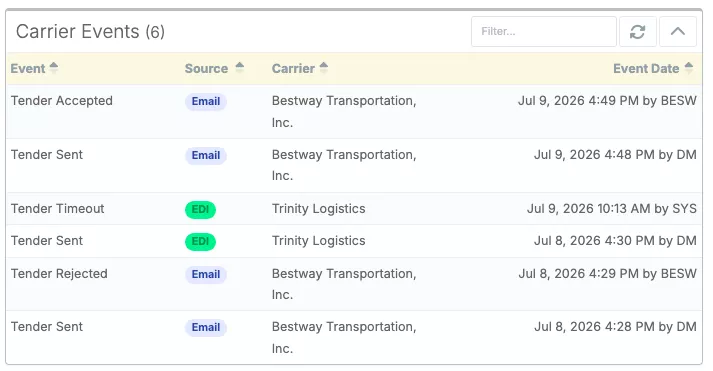
Shipment tender history is now captured and retained for all shipment modes through all tender communication methods (email, API, and EDI).
Now, users have full access to all tender activity and communication for every shipment. This complete record boosts visibility, making invoicing auditing, and troubleshooting faster and easier.
Multimodal Order & Load Consolidation
From the Orders tab, simply click the “Plan Shipments” button to start consolidation. FreightWise TMS then automatically reviews your orders and identifies opportunities to consolidate loads into direct shipments, saving you time and money.
Load Consolidation criteria will be based off the following factors:
- Pickup and delivery dates and locations
- Order Constraints:
- Transportation mode restrictions*
- Carrier requirements*
- Equipment Requirements*
- Temperature requirements
*See the new Constraints feature to set Mode, Carrier, and Equipment requirements at the order level
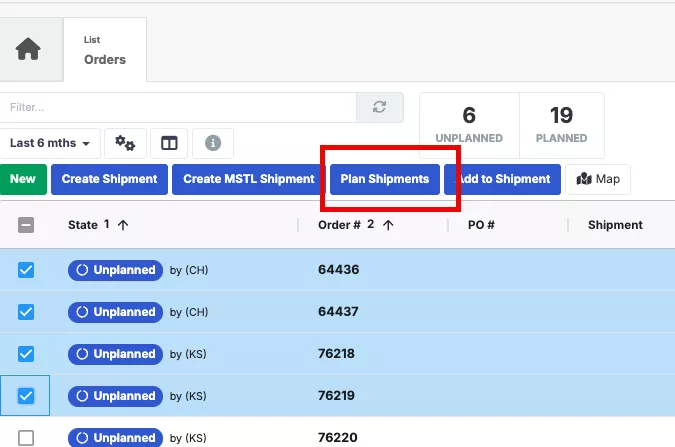
After orders are consolidated, direct shipments are created and ready for rate and carrier selection. Streamline planning, save money, and optimize your shipping through load consolidation.
To enable this feature contact your account manager.
Scheduling Pickup Updates
There are two core modifications for pickup requests for FreightWise users.
For pickup requests in the vendor portal:
For Vendor Portal users, vendors can now schedule pickup requests directly through the vendor portal. Once a shipment is created and a pickup is scheduled, the information will automatically appear in FreightWise TMS.
Please note:
- This feature must be enabled via a companywide setting, so email support@freightwisellc.com to enable this feature for all users.
- If you’d like to start using the vendor portal, contact support@freightwisellc.com for assistance with setup.
For pickup requests via public API/integration:
For our integrated customers, we’ve added a new endpoint to our APIs, allowing you to schedule pickups seamlessly through your integration.
Now you can complete every step of your shipment process, including creating the shipment, rating, generating documentation, scheduling pickups, and tracking, all through your integration. This means more control, greater efficiency, and a smoother shipping experience with FreightWise.
Check out our public API documentation to get started.
If you are ready to add this to your integration, contact your account manager.
Detailed Tracking
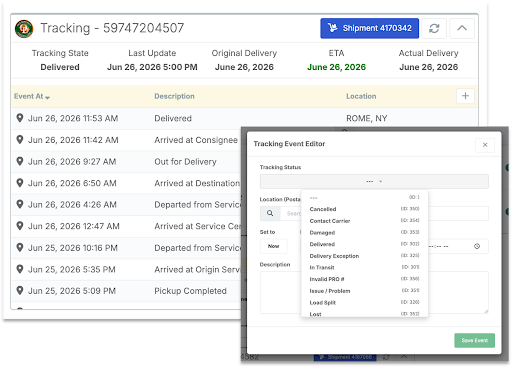
We have now enhanced Tracking within FreightWise to give you better visibility into your shipment timelines in the Tracking panel. Users can see a full ETA breakdown including the Original ETA, Estimated ETA, and Actual Delivery on a single screen. Shippers can now also manually add and log their own custom tracking events directly into the shipment timeline.
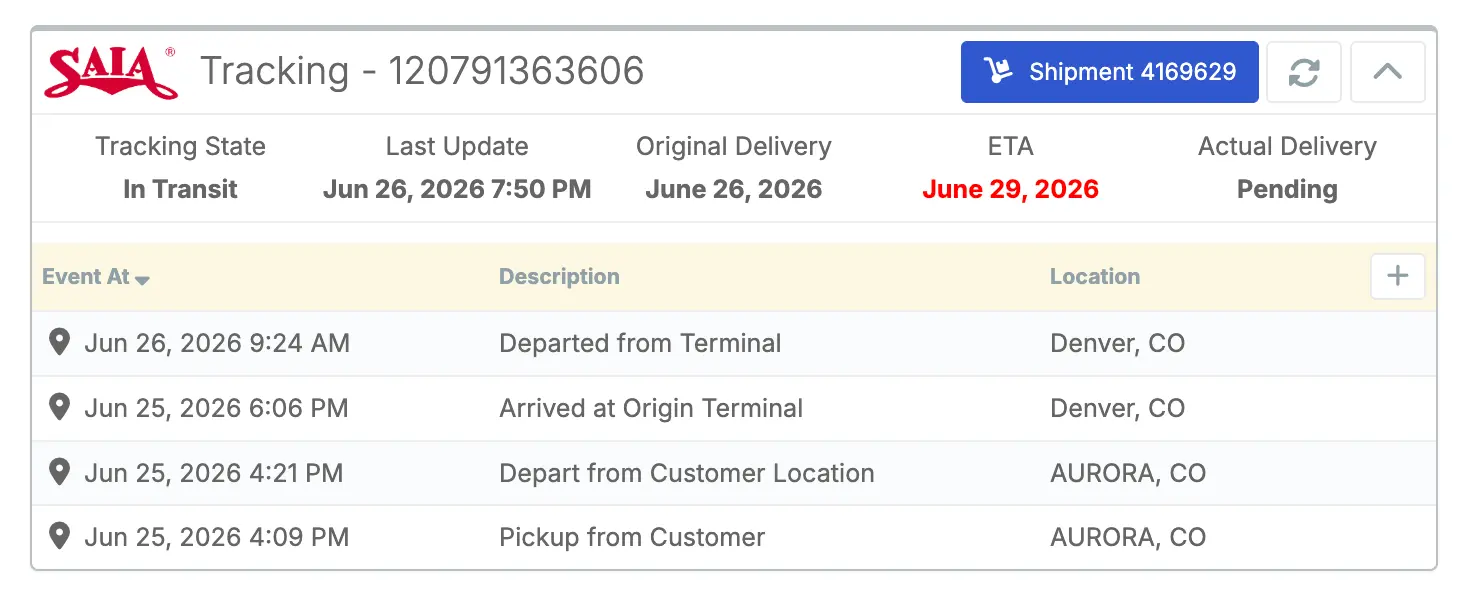
This detailed tracking now also provides equipment number and driver details as well.
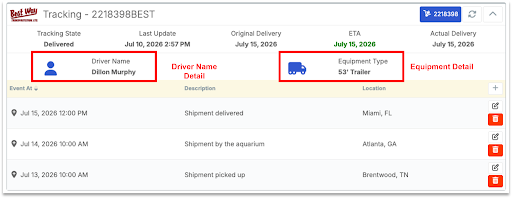
Easily add and log tracking events directly into the shipment timeline.
Order & Shipment Constraints
We know some users need shipments to move with a particular carrier, shipped a specific mode, or rated with a certain equipment type. If your orders or shipments have unique requirements, you can now set those directly within FreightWise via the UI or your Public API integration via Constraints. Any constraints set will be reflected in the rate results on a shipment.
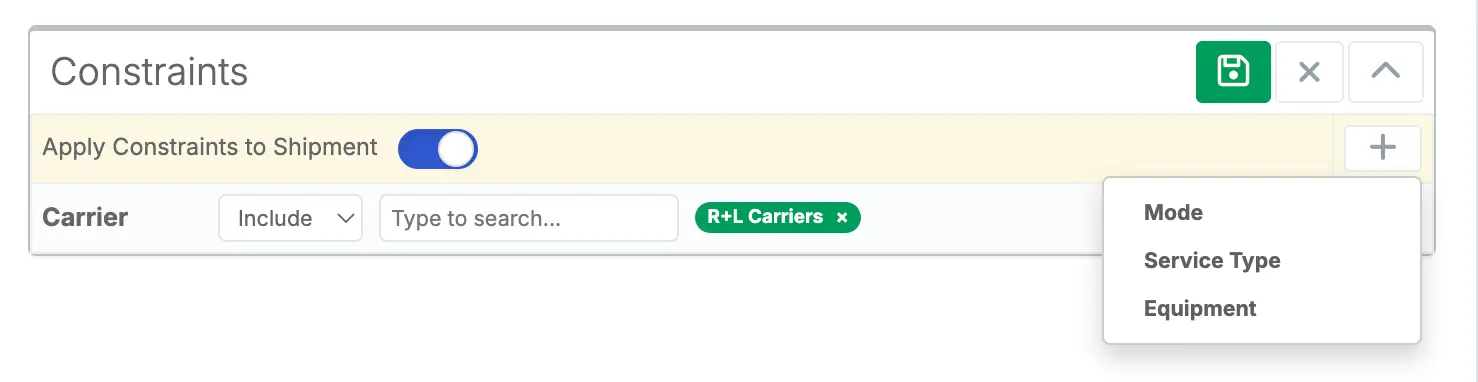
Here are a couple of ways you can use this feature:
- If you want a shipment rated only with a specific carrier or if you want to exclude a particular carrier from your rates, you can set that constraint on your shipment.
- If you need a shipment to only return rates of a certain mode, you can set that constraint.
- If you are consolidating orders into shipments. Shared constraints from the order level are inherited by the final shipment and will be reflected in the rate results on the shipment.
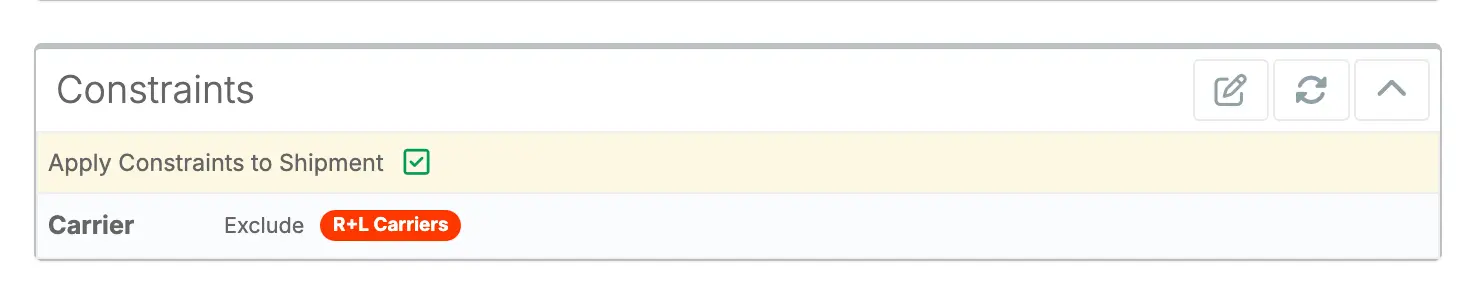
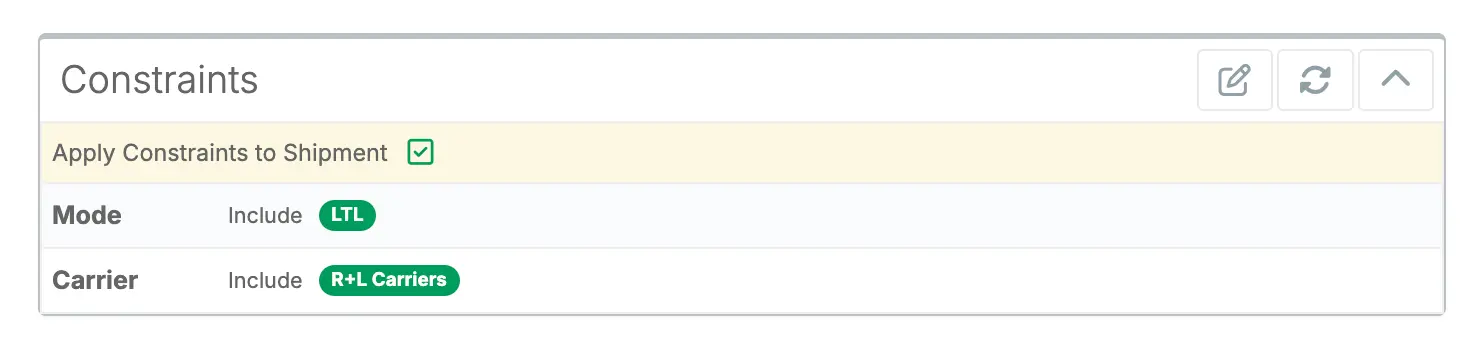
With these capabilities, FreightWise gives you the control to tailor your shipments exactly the way you need.
Helpful links: How to Video, API Documentation.
If you are interested in adding this capability to your integration, contact your account manager.
BOL Configuration & Enhancements
We have upgraded our Bill of Lading (BOL) function to have page numbers and other configurations better tailored to meet your specific shipping needs.
What’s New:
- Hours of Operation: Print specific warehouse hours right on the document.
- Hide Nested Commodities: Clean up the view by showing only top-level items.
- Consolidation: Hide “Description” and “Part #” if the BOL needs to be shorter.
- Quantity: Add a total piece count.
- Consignee Signature Line: Add a dedicated line for delivery sign-offs.
Reach out to support@freightwisellc.com if you need help adjusting your BOL settings.
Hazmat Commodity Support
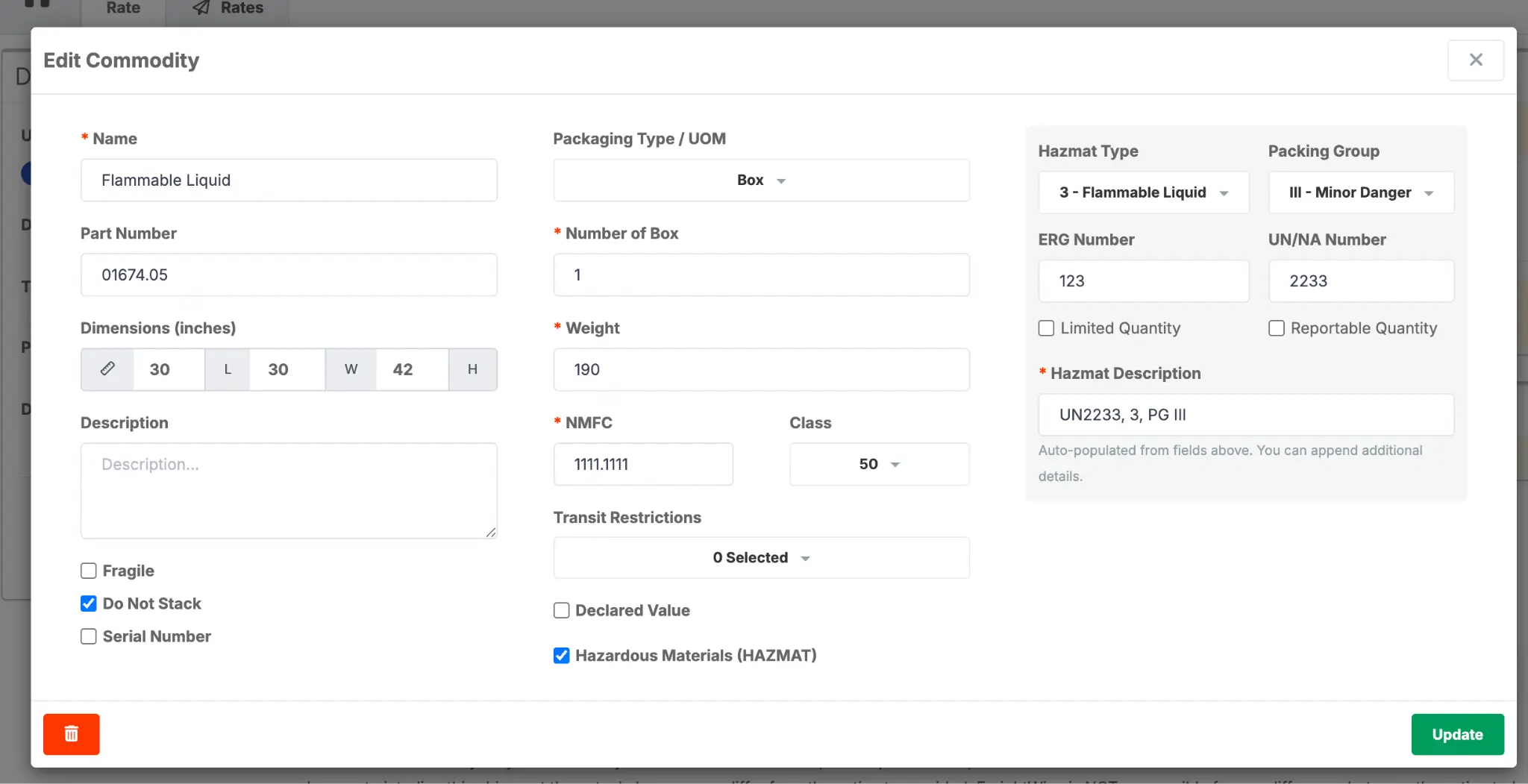
We have made updates within commodities to support deeper hazmat tracking, ensuring total compliance, and accurate documentation.
You can now add the following hazmat specifications to your shipment:
- Hazmat type
- Packing group
- ERG number & UN/NA Number
- Limited quantity
- Reportable quantity
Once these details are added by the user, they will be auto-populated into a hazmat description that is put on the BOL and transmitted to the carriers during pickup requests.
FreightWise Intelligence
We are thrilled to have launched FreightWise Intelligence directly within the FreightWise TMS! It is now the easiest way to drill into your LTL and small parcel data to spot trends and identify cost-saving opportunities.
We are launching three dashboards (LTL Exploration, Parcel Exploration, and Parcel Cost Control) which each contain over 10 reports with the ability to toggle and drill into information.
It is now available directly in the FreightWise platform. Simply login, and click on Intelligence.
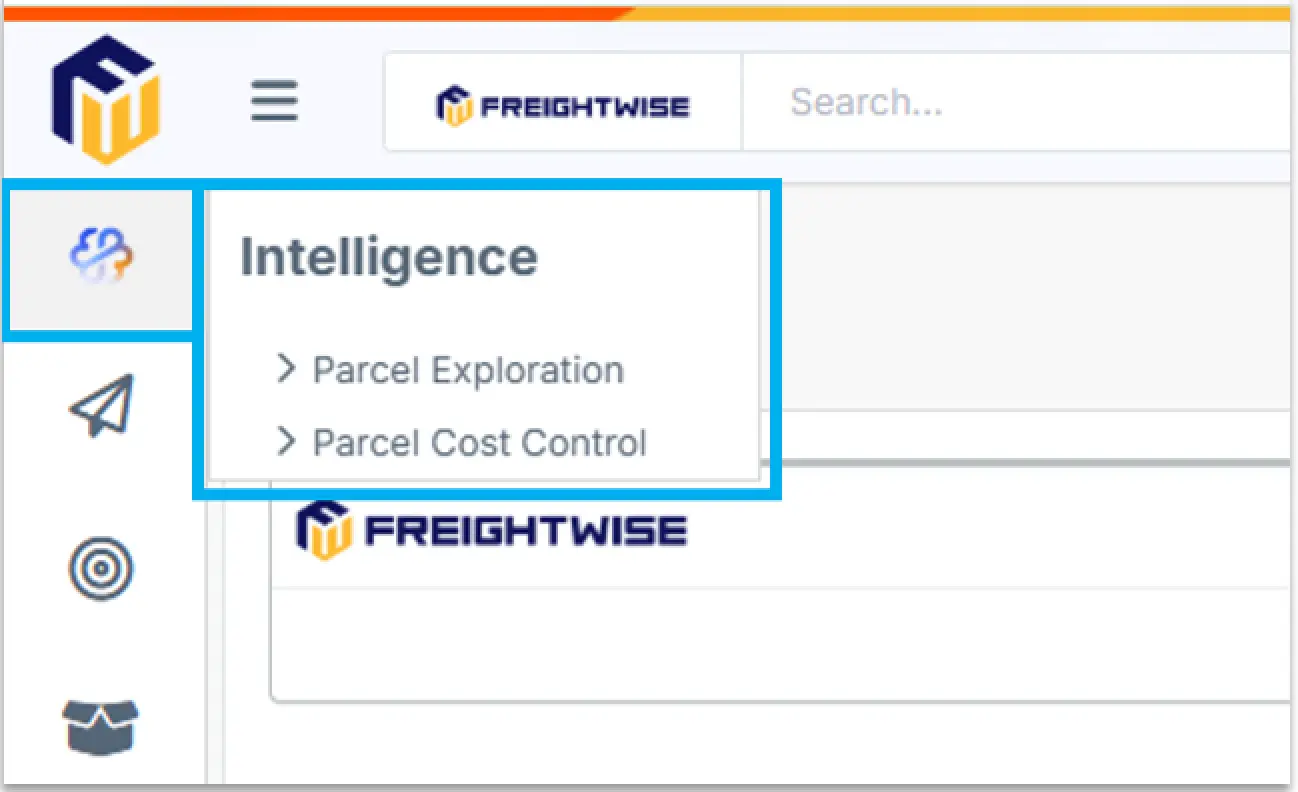
If you do not see the Intelligence tab within FreightWise, email support@freightwisellc.com to have FreightWise Intelligence enabled.
Auth0 Login Enhancements
An update was made to the FreightWise TMS login experience to enhance security with Auth0. This update enables optional single sign-on (SSO) and optional Multi-Factor Authentication (MFA). All user credentials and the login URL remain the same, however there is now a two-step login screen.
You will first enter your email, then your password.
If your IT team would like to set up SSO for your organization with FreightWise TMS, please email support@freightwisellc.com.
If you would like to setup Multi-Factor Authentication (MFA), please click here to see how to update.
One of our biggest releases yet!
We are excited to bring all of these new features to FreightWise TMS. If you have any questions, email support@freightwisellc.com.
Happy Shipping!